The Complete Guide to Ollama Alternatives: 8 Best Local LLM Tools for 2026
Explore 8 powerful alternatives to Ollama for local LLM deployment in 2026. This updated guide features the latest developments, from production-grade LLM serving engines (like vLLM’s V1 engine) to desktop platforms with agentic capabilities, helping you choose the perfect tool for your specific needs.
Running large language models locally isn't just a trend anymore. It's become essential infrastructure for developers who value privacy, cost control, and deployment flexibility. While Ollama remains a solid starting point for its simplicity, the local LLM ecosystem has matured dramatically. Today's alternatives aren't just "different options." They're purpose-built solutions addressing specific production challenges, workflow needs, and use cases that Ollama wasn't designed to handle.
If you've hit Ollama's ceiling, you're not alone. Let's find your next tool.
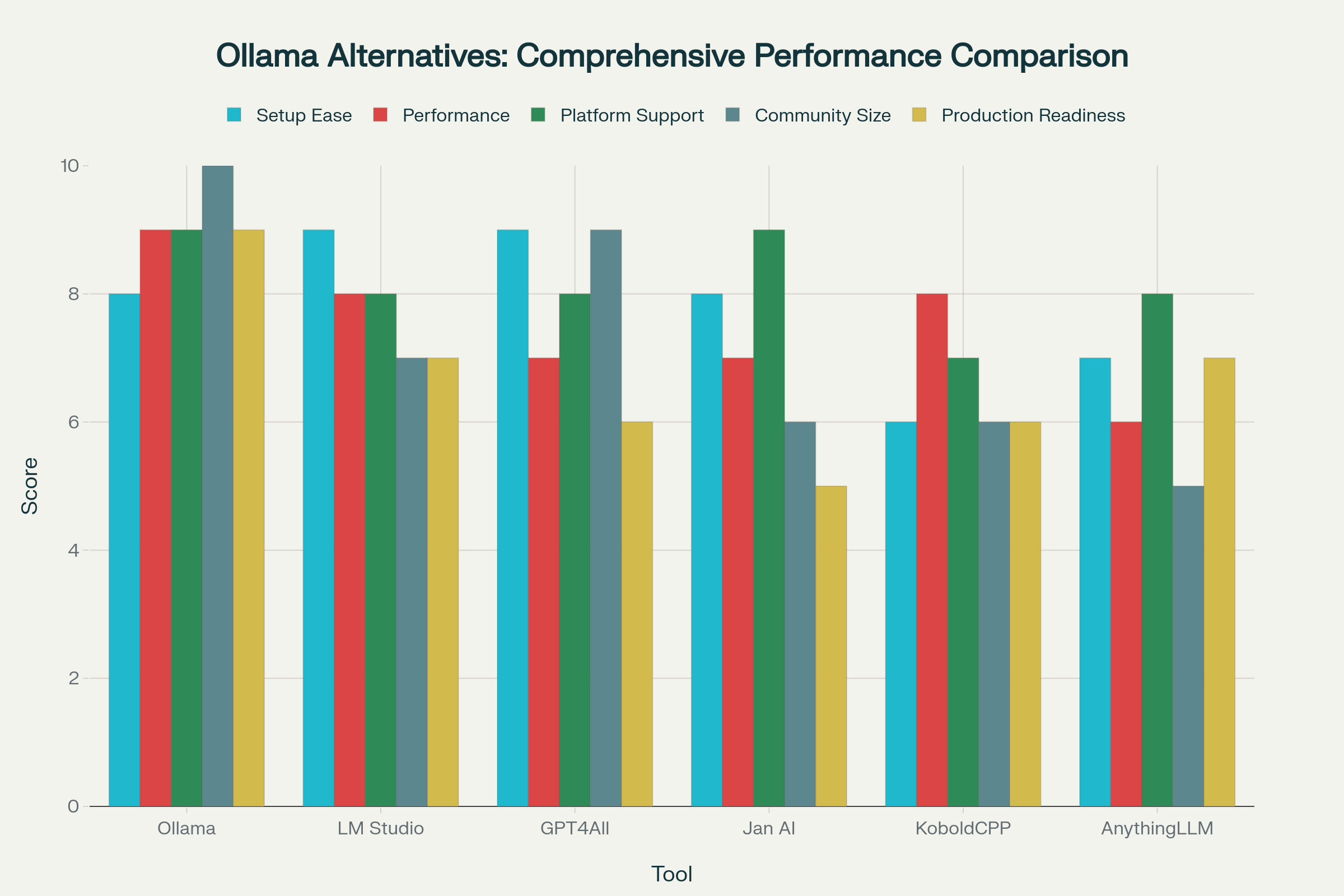
Why Look for an Ollama Alternative? Understanding the Trade-offs
Ollama nails the basics: one command pulls a model, another starts it chatting. But once you move beyond personal experiments, you'll run into scenarios where "simple" becomes "limiting."
Here's what typically drives developers to explore alternatives:
Higher performance & throughput: You're building something real - an app serving actual users concurrently. You need continuous batching, optimized memory management, and latency that doesn't spike under load.
A polished GUI with real features: Command-line tools are great until you're switching between five models, testing prompt formats, or explaining your setup to a non-technical teammate. You need desktop integration that actually saves time.
A true OpenAI API replacement: Your codebase already uses OpenAI's SDK. You want to swap the base URL to localhost and keep going - embeddings, tool calling, structured outputs, the works.
Absolute privacy & offline capability: You're working with sensitive data, or deploying on air-gapped infrastructure. "Mostly offline" isn't good enough.
Advanced customization & control: You need multiple backends, LoRA support, custom samplers, Jinja templates, or the ability to hot-swap experimental quantization formats without reinstalling everything.
This guide maps those needs to tools built explicitly to solve them, with 2026 updates included.
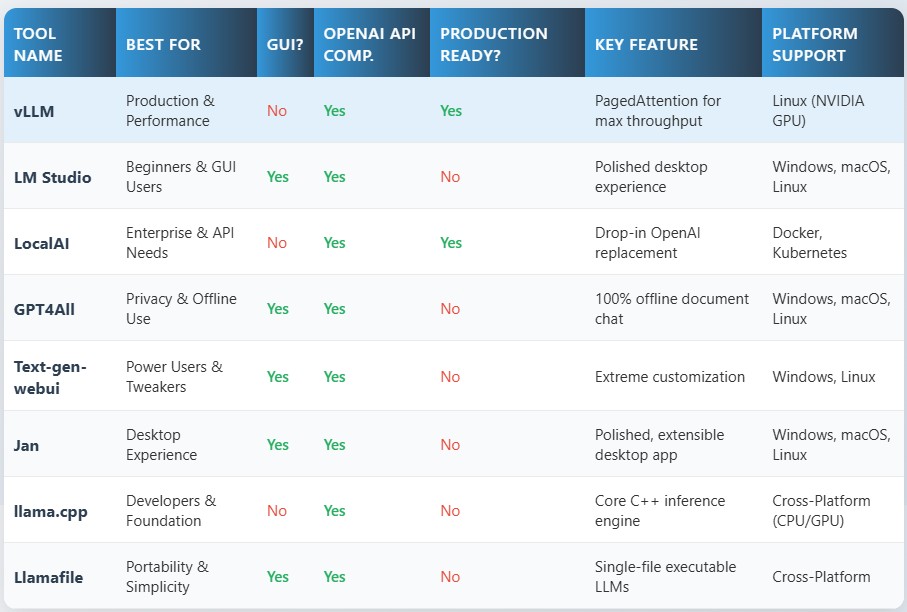
Comparison at a Glance: Top 8 Ollama Alternatives
The landscape has specialized significantly:
For production deployments, vLLM remains the performance king with its new V1 architecture, expanded OpenAI-compatible endpoints (embeddings, audio transcription, reranking), and vLLM-Omni for complete multimodal inference (text, images, audio, video). LocalAI continues as the universal API hub, an orchestration layer that routes requests to multiple backends (built-in or external like vLLM) through a single OpenAI-compatible endpoint, with MCP integration and distributed inference capabilities.
For desktop users, LM Studio has evolved into a full "local platform" with headless service mode and JIT model loading, while Jan has doubled down on agentic workflows with Project workspaces and Browser MCP. GPT4All remains the simplest privacy-first option, though it now also supports remote providers alongside local models.
For developers and power users, text-generation-webui delivers maximum customization with multi-backend support and a privacy-first stance (zero telemetry, file attachments, vision models). llama.cpp has matured into a production-capable server (llama-server) with OpenAI compatibility and direct Hugging Face downloads. Llamafile, now actively maintained again by Mozilla.ai, offers the most portable deployment story with its single-executable approach.
Deep Dive into the Top 8 Ollama Alternatives
1. vLLM: The Performance Champion (Updated V1 engine with Omni-Modal Support)
If you've looked at vLLM before, revisit it now. The project has completed its V1 engine migration. The old V0 architecture has been fully removed as of v0.11.0. This isn't just a version bump; it's a fundamental re-architecture that isolates the execution loop from CPU-intensive components like the API server and scheduler, eliminating bottlenecks that used to plague high-speed GPU deployments.
What's new in 2026:
The V1 engine brings "always-on" optimizations like chunked prefills and prefix caching under a unified scheduler, and vLLM now explicitly targets enterprise production workloads with minimal tuning required. The OpenAI-compatible server has expanded far beyond basic chat completions. It now includes /v1/embeddings, /v1/audio/transcriptions and /v1/audio/translations for ASR models, plus /v1/rerank and related scoring endpoints for embedding workflows. Hardware support has also broadened: vLLM v0.11.0 explicitly supports NVIDIA's Blackwell architecture (RTX 5090 / RTX PRO 6000 SM120) with native NVFP4/CUTLASS and block FP8 quantization. For detailed GPU recommendations and VRAM requirements for running these models, check our Best GPUs for Local LLM Inference in 2025 guide.
vLLM-Omni: The Multimodal Extension
In November 2025, vLLM introduced vLLM-Omni, described as "one of the first open-source frameworks to support omni-modality model serving." This extends vLLM's architecture beyond autoregressive text generation to support diffusion transformers (DiT), non-autoregressive inference, and heterogeneous model pipelines that combine multiple architectures. In practical terms, this means vLLM can now handle unified workflows like multimodal encoding → autoregressive reasoning → diffusion-based generation for text, images, audio, and video, all through the same serving infrastructure.
This positions vLLM not just as a text-first LLM server, but as a complete multimodal inference stack for production deployments.
Best use cases:
- High-concurrency production inference where latency under load matters
- Multi-user applications needing continuous batching
- Teams wanting a "local OpenAI" that includes embeddings, rerank, audio endpoints, and now multimodal generation
- Organizations needing unified infrastructure for text and visual/audio generation workflows
Trade-off to know: vLLM is primarily Linux + NVIDIA focused. If you're on Mac or need Windows-first tooling, look at LM Studio or llama.cpp instead.
2. LM Studio: The Local Platform (Not Just a GUI Anymore)
LM Studio has quietly transformed from "nice desktop app" into a complete local development platform. The big shift came with version 0.3.5, which introduced headless "Local LLM Service" mode, meaning you can now run the server in the background without keeping the GUI open.
What's new in 2026:
Just-In-Time (JIT) model loading arrived in 0.3.5, so your first API request can trigger automatic model loading without manual pre-loading. Built-in "Chat with Documents" (native RAG) shipped earlier in 0.3.0, with an in-app flow that distinguishes "fits in context" versus true RAG for longer docs. The OpenAI-compatible API surface now includes /v1/responses, /v1/models, /v1/chat/completions, /v1/completions, and /v1/embeddings, making it a legitimate local development server. The lms CLI matured significantly, allowing you to manage models, start/stop the server, and stream logs entirely from the terminal without launching the GUI.
Crucially, LM Studio introduced LM Link, a peer-to-peer encrypted mesh network that lets you offload heavy AI models to remote hardware. If your current PC is struggling, you can use our LM Link Guide to seamlessly connect your desktop app to a free Google Colab GPU.
Best use cases:
- Developers who want both a polished GUI and a local API server
- Rapid prototyping and model comparison workflows
- Teams needing cross-platform support (Windows, macOS, Linux) with minimal setup friction
For detailed guidance on optimizing LM Studio's context window and VRAM usage, see our How to Increase Context Length in LM Studio guide.
Trade-off to know: It's still not "production infrastructure." Think of it as your local dev server, not your prod deployment.
3. LocalAI: The Universal API Hub
LocalAI isn't just "another LLM server." It's an orchestration layer designed to act as a single OpenAI-compatible API front door for multiple backends, both built-in and external. Think of it as a universal adapter: your application talks to one endpoint, and LocalAI routes requests to whichever engine (local or remote) best fits that model.
How the architecture works:
LocalAI uses a gRPC-based plugin system that separates the API server (the "brain") from inference engines (the "muscles"). This lets you mix and match backends without changing your application code:
- Built-in backends: LocalAI ships with llama-cpp (GGUF models), stablediffusion-cpp (images), whisper-cpp (audio), transformers (Hugging Face), and diffusers (video).
- External orchestration: You can connect LocalAI to external engines running separately. For example, you can route high-throughput requests to a vLLM instance while keeping image generation local via stablediffusion-cpp, all through the same API endpoint.
What's new in 2026:
The Assistants endpoint was removed (release notes: "drop assistants endpoint"), so don't expect Assistants API parity. What you get instead is native MCP (Model Context Protocol) support with dedicated /mcp/v1/.... endpoints for agentic tool-use workflows. Backend coverage expanded: Apple MLX backends (mlx, mlx-audio, mlx-vlm) are now first-class, and WAN video generation arrived via the diffusers backend.
LocalAI also documents "Distributed Inference" as a core feature, positioning itself as a tool that can federate across local nodes. The WebUI gained practical ops features (download model configs, stop backends, import/edit models), and the project introduced a Launcher app (alpha) for simplified installation.
Why use LocalAI instead of just running llama.cpp or vLLM directly?
LocalAI offers model variety (text, image, audio, video in one API), backend switching without changing app code, one-click model installs from gallery repos, built-in MCP + LocalAGI integration for agentic features, and P2P/federated inference for distributed scaling. These are capabilities that raw engines like llama-server or vLLM typically don't provide out of the box.
Best use cases:
- Teams wanting "self-hosted OpenAI" with multi-modal capabilities managed through one API
- Docker/Kubernetes deployments where you need to route different request types to different engines
- Organizations needing MCP support for agent/tool workflows
Trade-off to know: Setup complexity is higher than desktop apps. Expect to configure backends, model paths, YAML configs, and potentially Docker/K8s orchestration. This is infrastructure tooling, not a "download and chat" app.
4. GPT4All: The Privacy-First Desktop (Now Hybrid)
GPT4All remains the easiest path to "100% offline chat with local documents," but it's no longer purely offline. Recent releases added "Remote Models" as a first-class feature, giving users the option to connect to external providers (Groq, OpenAI, Mistral) alongside local models.
What's new in 2026:
Windows ARM support was added (CPU-only), broadening platform coverage. A built-in "Reasoner v1" workflow shipped, including a JavaScript code interpreter tool for multi-step reasoning tasks. The chat templating system was overhauled to use Jinja-style templates with better model compatibility. The Local API Server exists and works, but it's explicitly documented as implementing only a subset of OpenAI's API, specifically /v1/models, /v1/completions, and /v1/chat/completions, and it binds only to localhost (127.0.0.1) by design.
Best use cases:
- Maximum privacy + simple "chat with local docs" on a single machine
- Users who want a GUI-first offline tool with optional cloud add-ons
- Consumer-grade hardware (CPU-focused, lightweight memory footprint)
Trade-off to know: If you need a full-featured local API server for app development, LM Studio or llama.cpp are better bets. GPT4All's server is intentionally minimal and localhost-only.
5. Text-generation-webui: The Power-User Workbench
text-generation-webui (oobabooga) is still the "AUTOMATIC1111 of text generation." If you want maximum control, this is it. The project now explicitly markets itself as "100% offline and private, with zero telemetry, external resources, or remote update requests."
What's new in 2026:
Built-in file attachments now cover text files, PDF, and .docx for "chat about the contents" workflows, not full vector-DB RAG, but native doc ingestion. Multimodal support is first-class: vision models are supported, and users can attach images to messages for visual understanding (both UI and API). Optional web search is now a core feature with ongoing work to keep it functional. Prompt formatting moved to "automatic prompt formatting using Jinja2 templates," and recent releases show major improvements in template handling.
Backend coverage is broader: llama.cpp, Transformers, ExLlamaV3, ExLlamaV2, and TensorRT-LLM are all called out as supported loaders. The OpenAI-compatible API explicitly includes tool-calling support. And "portable builds" are now an official installation path, self-contained packages for GGUF/llama.cpp that require no Python environment setup, available in multiple GPU/CPU variants.
Best use cases:
- Researchers and tinkerers needing every dial exposed
- Users wanting one UI across multiple inference backends
- Privacy-critical workflows where "zero telemetry" must be verifiable
Trade-off to know: Complexity is the price. If you just want to chat with a model, this is overkill.
6. Jan: The Agentic Desktop
Jan's positioning centers on "desktop automation + tools," and it's moved well beyond "simple local chat app." The modern Jan is built around Projects, MCP workflows, and a local API server with real security controls.
What's new in 2026:
Version 0.7.0 introduced Projects, a major workflow concept for organizing chats, files, and model configs into distinct workspaces. Tool calling and agentic workflows became central: MCP moved "out of experimental," and Jan released its own "Jan Browser MCP" for browser automation. Multimodal support matured significantly, with image uploads and vision model imports becoming stable. File attachment capability was explicitly improved in v0.7.4.
The local API server is now more production-like: it requires API keys (sent as Authorization: Bearer), supports "Trusted Hosts" allowlisting, and has clear bind-to-local vs bind-to-network guidance for security-conscious deployments.
Best use cases:
- Desktop users wanting agentic workflows with local models
- Teams experimenting with MCP-based automation (especially browser automation via Jan Browser MCP)
- Developers who want both a polished GUI and a secure local API server
Trade-off to know: Jan also added cloud/provider support over time, so it's no longer purely local if you enable those integrations.
7. llama.cpp: The Core Engine (And Now a Real Server)
llama.cpp remains the foundational inference library powering much of the ecosystem, but it now ships a much more product-like experience via llama-server, a lightweight, OpenAI-compatible HTTP server with a built-in WebUI accessible on localhost.
What's new in 2026:
Model acquisition is dramatically easier: llama-cli and llama-server can directly download models from Hugging Face via -hf
Backend coverage is explicitly documented in a supported-backends table: Metal, CUDA, HIP, Vulkan, SYCL, and more. llama.cpp releases now provide many prebuilt binaries across OS/arch/backend combinations, so you don't always need to compile from source.
Best use cases:
- Developers building custom apps/agents who want a minimal, embeddable runtime
- Maximum hardware portability (runs on virtually anything: CPU, GPU, mobile, multiple OSes)
- Teams comfortable with CLI/code who want OpenAI-compatible endpoints without heavy frameworks
Trade-off to know: llama.cpp releases are high-volume (thousands of entries), so flags and behavior can change quickly. Always link to official docs rather than pinning to old tutorials.
8. Llamafile: The Portable Executable (Revived by Mozilla)
Llamafile's unique value proposition, bundle a model + runtime into a single executable you can copy and run, hasn't changed. What has changed is that Mozilla.ai publicly committed to reviving and modernizing the project in late 2025, after it had gone dormant.
What's new in 2026:
Recent releases added support for newer model families: DeepSeek Distil R1, Gemma 3, IBM Granite, Phi-4, and Qwen3. A new LocalScore benchmarking utility (localscore) shipped, and you can run it directly via ./llamafile --localscore. A major server evolution ("llamafiler" / "server v2") is documented, with release notes explicitly stating improvements to OpenAI /v1/* endpoint compatibility.
The new server added product-level UX features: progress bar for prompt processing, indicating truncated messages, forgetting old messages when out of context, upload button + text file support. Llamafile also moved toward an "Ollama-like" default experience: launching the binary runs a CLI chatbot in the foreground and starts the server in the background (with --chat / --server to disambiguate).
Best use cases:
- Portable demos, offline distribution, edge deployments
- Situations where dependency-free packaging matters more than maximum throughput
- "Just run this file" workflows for non-technical users
Trade-off to know: Performance is respectable but not competitive with vLLM or heavily tuned llama.cpp setups. Portability is the main selling point.
Honorable Mentions: Specialized Tools Worth Knowing
While the top 8 cover the majority of use cases, several specialized tools have emerged that excel in specific scenarios. Here are the ones worth considering if your needs align with their strengths:
SGLang: Structured Generation at Scale
SGLang (Structured Generation Language) is a high-performance runtime that treats LLM workloads as programs rather than isolated prompts. It uses vLLM as its backend inference engine but adds a programming layer specifically optimized for structured outputs, multi-step reasoning, and complex workflows.
Key innovations:
The runtime introduces Radix Attention, which dramatically improves KV cache reuse across multiple calls by treating prompts as evolving programs. For structured outputs (JSON schemas, grammars), SGLang uses compressed finite state machines that collapse deterministic token sequences into single forward passes, delivering up to 1.6× throughput improvement over token-by-token constrained decoding. The system also supports speculative execution for API-based models (like GPT-4), allowing it to cache extra tokens beyond stop conditions and reuse them in subsequent calls without additional API requests.
Best for: Production applications requiring strict JSON/grammar output constraints, agentic systems with multi-step reasoning workflows, and teams building complex LLM programs where KV cache reuse matters. SGLang provides day-0 support for latest models including Mistral Large 3, Nemotron 3 Nano, and others.
Trade-off: More complex than simple OpenAI-compatible servers. Designed for developers comfortable programming LLM workflows rather than just calling APIs.
TensorRT-LLM: Maximum NVIDIA Performance
TensorRT-LLM is NVIDIA's official inference library, optimized specifically for NVIDIA GPUs with performance claims that often exceed vLLM. Independent benchmarks show TensorRT-LLM achieving 30-70% faster throughput than llama.cpp on the same consumer NVIDIA hardware (RTX 3090/4090), with 20%+ smaller compiled model sizes and more efficient VRAM utilization.
Key advantages:
TensorRT-LLM supports the latest NVIDIA architectures (Blackwell, Hopper, Ada Lovelace, Ampere) with architecture-specific optimizations that raw PyTorch or generic frameworks can't match. It uses negligible RAM after initial model warmup, fully utilizing GPU VRAM for maximum throughput. On a GeForce RTX 4090, benchmarks show 170.63 tokens/second vs llama.cpp's 100.43 tokens/second, a 69.89% improvement.
Best for: Production deployments on NVIDIA infrastructure where maximum throughput justifies the setup investment. Teams with dedicated ML engineers comfortable with GPU compilation and architecture-specific optimization.
Trade-offs: Models must be compiled for specific OS and GPU architectures (no "compile once, run everywhere" portability like llama.cpp). Does not support older-generation NVIDIA GPUs. Setup complexity is significantly higher than vLLM or llama.cpp. Expect 1-2 weeks for production configuration.
A Guide to Popular Models for Your Local LLM Tool
It's crucial to understand the difference between the tools (like Ollama or vLLM) and the models that run on them. Think of the tools as "game consoles" and the models as "game cartridges." Here's a comprehensive overview of the most popular models you can run on these tools:
Llama 3.1 & 3.3
Developer: Meta
Why it's popular: These are the latest and most capable versions of Meta's open-source family. Llama 3.1 features enhanced 8B and 70B models with improved reasoning and a large 128K token context window. Llama 3.3 further refines the 70B model with multilingual support and advanced benchmarks.
Best for: General-purpose chat, instruction following, and building conversational AI applications.
DeepSeek R1 & V3
Developer: DeepSeek AI
Why it's popular: These models are known for their exceptional reasoning, coding, and mathematical abilities. DeepSeek-R1-0528, a recent update, shows performance approaching that of closed models like Gemini 2.5 Pro. DeepSeek-V3 is a massive Mixture of Experts (MoE) model with performance comparable to GPT-4o.
Best for: Tasks requiring complex logic, programming, and advanced reasoning.
Qwen 3 series
Developer: Alibaba Cloud
Why it's popular: These models have strong multilingual capabilities and high accuracy across benchmarks, especially for coding and math. The Qwen 3 series includes smaller, optimized versions for local inference.
Best for: Multilingual tasks, creative writing, and summarization.
Phi-4
Developer: Microsoft
Why it's popular: As the successor to the Phi-3 "small, smart" models, Phi-4 is designed for maximum quality in a minimal size. It offers a high performance-to-size ratio, making it ideal for devices with limited memory.
Best for: On-device AI, edge computing, and cost-effective AI solutions where larger models are impractical.
Gemma 2 & 3
Developer: Google DeepMind
Why it's popular: Built with the same core technology as the Gemini models, the Gemma family offers efficient deployment on resource-constrained devices. Gemma 3 introduces multimodal support for models with over 4 billion parameters.
Best for: Reasoning, summarization, and deployment on consumer hardware and edge devices.
Mixtral 8x22B
Developer: Mistral AI
Why it's popular: This Mixture of Experts (MoE) model offers excellent performance by activating only a subset of its parameters at any given time. This provides high accuracy at a lower computational cost, making it an efficient choice for local use.
Best for: Balancing performance with resource efficiency, especially for generating conversational AI.
How to choose the right local LLM model
To select the best model for your needs, consider these factors:
Hardware Considerations:
- If VRAM is limited, efficient models such as Phi-4 or the smaller versions of Gemma and Qwen 3 are a good choice.
- For high-end hardware, larger and more powerful models like Llama 3.3 70B or Mixtral 8x22B can be explored.
Use Case Alignment:
- For general-purpose tasks like writing or summarizing, Llama 3.3 is a strong choice.
- For code generation, specialized models like DeepSeek Coder or Qwen 3 Coder are better.
- If powerful reasoning is needed, consider DeepSeek R1 or V3.
License and Purpose:
All listed models have permissive licenses that allow for commercial use. However, confirm the specific license details, especially for large enterprise deployments.
VRAM-Specific Recommendations:
For detailed model recommendations optimized for your specific hardware:
- Best Local LLMs for 8GB VRAM - Optimized for budget GPUs
- Best Local LLMs for 16GB VRAM - Mid-range GPU recommendations
Final Thoughts: Match the Tool to the Job
Choosing the best Ollama alternative isn't about finding a universal winner, it's about matching the tool to your specific needs and where Ollama fell short.
If you're serving production traffic, vLLM's V1 architecture is purpose-built for that. If you're a solo developer who wants both a nice GUI and a local API server, LM Studio nails that balance. If you need absolute privacy with zero telemetry and don't mind complexity, text-generation-webui is your tool. And if you just want to double-click an executable and start chatting offline, Llamafile remains the simplest path.
The local LLM ecosystem has matured past "Ollama clones." These are specialized tools solving real problems. Pick the one that solves yours.
Frequently Asked Questions
Which Ollama alternative is best for production deployment?
The choice depends on your scale and requirements. vLLM is the throughput king for high traffic APIs serving hundreds of concurrent users on high-end GPUs (A100/H100), delivering 2-4x more concurrent requests than alternatives thanks to PagedAttention and continuous batching. llama.cpp is the reliability workhorse for edge computing, internal tools, and privacy-first deployments, rock solid for long context reasoning with zero dependencies and runs on anything from laptops to ARM devices. LocalAI acts as a universal API hub and orchestration layer, providing a single OpenAI-compatible endpoint that can route requests to multiple backends (both built-in like llama-cpp and external like vLLM) while managing multi-modal models (text, images, audio, video) for enterprise middleware scenarios.
What's the most user-friendly alternative to Ollama?
LM Studio and Jan are the most user-friendly alternatives to Ollama. Both offer polished graphical interfaces, model management, and chat capabilities across Windows, macOS, and Linux, making them perfect for users who prefer GUI over command-line tools.
Can I run these tools completely offline?
Yes, most Ollama alternatives can run completely offline once models are downloaded. Some tools now offer hybrid approaches with optional remote provider support, while others maintain strict offline-only operation with zero telemetry. Check each tool's specific privacy and connectivity features to match your requirements.
Do I need a GPU to use these alternatives?
While a GPU significantly improves performance, many tools support CPU-only operation. llama.cpp and Llamafile are particularly efficient for CPU use, while tools like LM Studio and GPT4All offer optimized CPU inference. However, for production workloads or larger models, a GPU is recommended.
Which alternative offers the best API compatibility?
LocalAI and vLLM provide the best OpenAI API compatibility. LocalAI is designed as a drop-in replacement for OpenAI's API, while vLLM offers high-performance API serving with OpenAI-compatible endpoints. This makes them ideal for migrating existing applications from cloud to local deployment.