Best Local LLMs for 24GB VRAM: Performance Analysis 2026
With 24GB of VRAM, you're in the sweet spot. Q4 quantized open weights models in the 27B-40B parameter range deliver serious reasoning power, multimodal capabilities, and coding skills that compete with commercial AI offerings, all running locally on your hardware for complete privacy. But here's the catch: a model dominating MMLU-Pro benchmarks might produce broken code in real projects. Another with a stellar Math Index could hit a "context cliff" at 48K tokens, grinding to a halt when you need it most. And benchmark scores won't tell you which model can autonomously build a working game from a single prompt. New to local LLMs? Start with our complete introduction to local LLMs to understand the basics.
This guide takes a different approach: we combined three independent validation methods to find what actually works on 24GB VRAM systems. First, we analyzed industry-standard benchmarks (Intelligence Index, GPQA, SciCode, TAU2) to establish baseline capabilities across reasoning, coding, and instruction-following. Second, we profiled hardware performance metrics using Ollama and llama.cpp on an NVIDIA L4 24GB GPU, measuring real VRAM consumption, decode speed degradation across context windows, prefill throughput, and the critical "context cliff" phenomenon. Third, we ran an agentic coding challenge using the Cline extension in Cursor IDE: build a high-quality Flappy Bird clone with a Python backend, giving each model autonomy to architect and debug the full stack.
The verdict? Qwen3.6 27B (Reasoning) completely reshapes the landscape with a staggering 45.8 Intelligence Index, while Gemma 4 31B (Reasoning) takes the crown for pure coding tasks with a 38.7 Coding Index. For raw efficiency, the MoE architecture of Qwen3.6 35B A3B (Reasoning) delivers blistering inference performance without sacrificing deep reasoning. Everything else involves serious trade-offs. Here's how we tested them and why it matters.
TL;DR: Best Local LLMs for 24GB VRAM in 2026
Top Recommendations:
- Qwen3.6 27B (Reasoning): Best overall with an unmatched 45.8 Intelligence Index, best-in-class TAU2 (94.2%) for agentic tasks, and the winner of our hands-on coding challenge.
- Gemma 4 31B (Reasoning): Best for coding and technical tasks, leading with a 38.7 Coding Index, highest GPQA (85.7%), and SciCode (43.4%). Most stable context cliff performance in Ollama.
- Qwen3.6 35B A3B (Reasoning): Best decode speed at short contexts (65.6 t/s in llama.cpp). MoE architecture keeps VRAM lean. With
--n-cpu-moe 12, it handles the full 64K context on 24GB. - Gemma 4 26B A4B: The long-context reliability champion. It is rock-solid from 8K to 64K in both Ollama and llama.cpp, losing less than 15% speed across the full sweep.
Quick Start: Download & Run
Ready to get started? Here are the llama.cpp / Ollama commands to download and run these open source large language models locally:
| Model | Best For | Ollama Command | Ollama Library |
|---|---|---|---|
| Qwen3.6 27B | General Intelligence | ollama run qwen3.6:27b | View on Ollama |
| Gemma 4 31B | Coding & Logic | ollama run gemma4:31b | View on Ollama |
| Qwen3.6 35B A3B | Speed & MoE Efficiency | ollama run qwen3.6:35b-a3b | View on Ollama |
Note: These commands will download the Q4_K_M quantized versions by default, which are optimized for 24GB VRAM systems.
Benchmark Performance Analysis
The interactive chart below shows performance across industry-standard benchmarks. Select metrics to compare models directly.
AI Model Performance Comparison
| Model Name | Creator | Release Date | Artificial Analysis Intelligence Index | Artificial Analysis Coding Index | GPQA Diamond (Scientific Reasoning) | Humanity's Last Exam (HLLE) | SciCode (Scientific Coding) | IFBench | LCR | TerminalBench Hard | TAU2 |
|---|---|---|---|---|---|---|---|---|---|---|---|
| Qwen3.6 27B (Reasoning) | Alibaba | 2026-04-22 | 45.8% | 36.5% | 84.2% | 21.6% | 39.8% | 67.6% | 68.7% | 34.8% | 94.2% |
| Qwen3.6 35B A3B (Reasoning) | Alibaba | 2026-04-16 | 43.5% | 35.1% | 84.1% | 20.2% | 35.8% | 64.4% | 63.7% | 34.8% | 95.3% |
| Gemma 4 31B (Reasoning) | 2026-04-02 | 39.2% | 38.7% | 85.7% | 22.7% | 43.4% | 75.6% | 62.0% | 36.4% | 59.9% | |
| Qwen3.6 27B (Non-reasoning) | Alibaba | 2026-04-22 | 37.1% | 26.6% | 82.9% | 13.6% | 37.3% | 45.7% | 55.0% | 21.2% | 93.6% |
| Gemma 4 31B (Non-reasoning) | 2026-04-02 | 32.3% | 33.9% | 76.3% | 11.5% | 41.1% | 53.5% | 36.0% | 30.3% | 65.5% | |
| Qwen3.6 35B A3B (Non-reasoning) | Alibaba | 2026-04-16 | 31.5% | 17.6% | 81.7% | 12.5% | 1.3% | 36.2% | 56.7% | 25.8% | 85.1% |
| Gemma 4 26B A4B (Reasoning) | 2026-04-02 | 31.2% | 22.4% | 79.2% | 18.3% | 40.0% | 72.4% | 55.7% | 13.6% | 43.6% | |
| GLM-4.7-Flash (Reasoning) | Z AI | 2026-01-19 | 30.1% | 25.9% | 58.1% | 7.1% | 33.7% | 60.8% | 35.0% | 22.0% | 98.8% |
| Nemotron Cascade 2 30B A3B | NVIDIA | 2026-03-19 | 28.4% | 25.8% | 75.8% | 11.4% | 34.8% | 80.4% | 34.0% | 21.2% | 53.2% |
| Gemma 4 26B A4B (Non-reasoning) | 2026-04-02 | 27.1% | 29.1% | 71.4% | 10.7% | 37.3% | 45.4% | 39.7% | 25.0% | 40.4% | |
| NVIDIA Nemotron 3 Nano 30B A3B (Reasoning) | NVIDIA | 2025-12-15 | 24.3% | 19.0% | 75.7% | 10.2% | 29.6% | 71.1% | 33.7% | 13.6% | 40.9% |
Key Benchmark Insights
General Intelligence and Reasoning Tasks
The 24GB VRAM category is now utterly dominated by the latest generation of reasoning models. Qwen3.6 27B (Reasoning) leads the pack with a staggering 45.8 Intelligence Index, proving that dense models under 30B parameters can punch far above their weight class. Close behind is its Mixture-of-Experts sibling, the Qwen3.6 35B A3B (Reasoning) at 43.5. Google's Gemma 4 31B (Reasoning) also joins the elite tier with an impressive 39.2 Intelligence Index. What's crucial to note is the massive gap between the reasoning and non-reasoning variants: the baseline Gemma 4 31B scores 32.3, meaning activating the reasoning pathways grants a near 7-point intelligence boost on the exact same architecture.
Coding and Development
When it comes to pure development, Gemma 4 31B (Reasoning) takes the crown with a 38.7 Coding Index and an outstanding 43.4% on SciCode. It's incredibly capable at generating precise, functional code for complex logic. However, Qwen3.6 27B (Reasoning) is right on its heels with a 36.5 Coding Index and boasts a massive 94.2% on TAU2. For developers, this means you have two distinct powerhouse options that comfortably fit inside 24GB of VRAM (especially when quantized), capable of full-scale agentic code execution.
Science, Math, and Raw Speed
The benchmark data highlights interesting trade-offs between raw performance and architecture. The Qwen3.6 35B A3B (Reasoning) is a Mixture-of-Experts model that delivers blistering inference speeds thanks to its sparse activation, firing only 3B parameters per token while maintaining a 43.5 Intelligence Index. In scientific reasoning, Gemma 4 31B (Reasoning) leads with the highest GPQA score (85.7%) among the four models. The Gemma 4 26B A4B, while lighter on benchmarks, proves its real-world value in the hardware section: it's the only model to sustain full GPU execution from 8K all the way to 64K context in both Ollama and llama.cpp without significant slowdown.
The Bottom Line
If you have a 24GB GPU, your local AI capabilities have never been stronger. Qwen3.6 27B (Reasoning) is the undisputed all-rounder champion for general intelligence. Gemma 4 31B (Reasoning) is the premier choice for coding and logical development. If speed is your primary concern for agentic workflows, the MoE architecture of Qwen3.6 35B A3B delivers commercial-grade rapidity without sacrificing deep reasoning.
Practical Inference Performance Testing: Where Theory Meets Hardware
We ran both Ollama and llama.cpp (Q4_K_M via Unsloth GGUF) on an NVIDIA L4 24GB GPU to see how these open source models handle heavy workloads. For each model we swept context sizes of 8K, 16K, 32K, and 64K tokens, filling 80% of each context with real text, replicating what you would see in a long coding session or document analysis workflow. This is how the "context cliff" shows up in practice.
Hardware Benchmarks: The Context Cliff
Test Setup: GPU: NVIDIA L4 · 24 GB VRAM · CUDA 12.6 · Ubuntu 24.04 · Driver: 550.x | Quantization: Q4_K_M (Unsloth GGUF) | Context fill: 80% of configured context with real LLM-related text, 512 output tokens per run | Ollama params: default server settings, num_ctx set per context size | llama.cpp params: -ngl 99 --flash-attn on --host 0.0.0.0, MoE flag noted where used
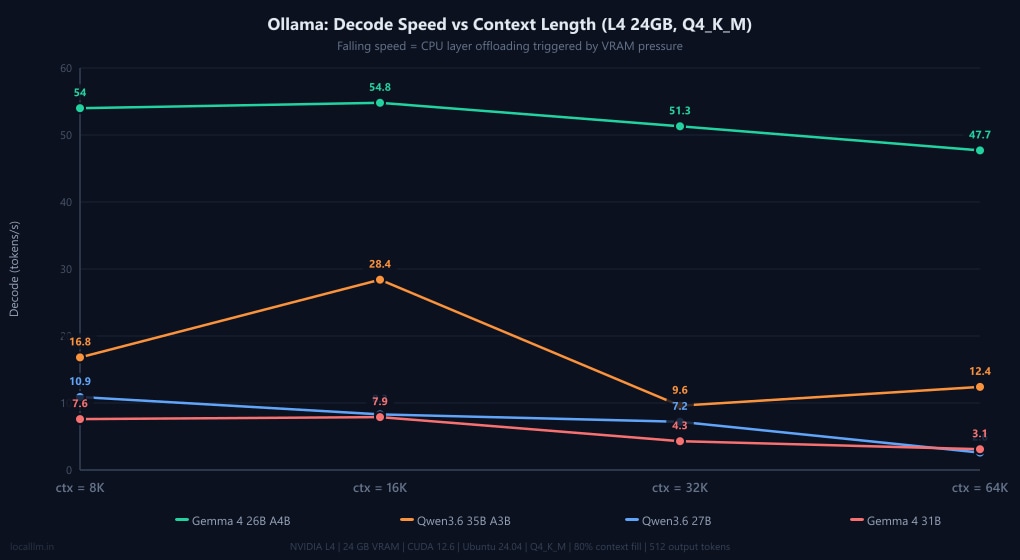
The results reveal a stark split in behaviour. Gemma 4 26B A4B (a MoE model with only ~4B active params) is the undisputed stability champion. It runs entirely on GPU from 8K all the way to 64K in both Ollama and llama.cpp, losing less than 15% decode speed across the full sweep. Qwen3.6 27B is rock-solid inside llama.cpp but hits a hard context cliff in Ollama at 64K, where RAM usage jumps to 9.5 GB and decode collapses to 2.6 t/s. Qwen3.6 35B A3B is the speed king in llama.cpp, hitting a staggering 65.6 t/s at 8K, but it hits an OOM wall at 64K without an extra flag. Gemma 4 31B has a large KV cache footprint that fills VRAM quickly: llama.cpp can only serve it at 8K context (10.6 t/s), while Ollama manages higher contexts by dynamically offloading layers to system RAM, which explains the 3.1 t/s collapse at 64K.
Practical Insight: In our testing, speeds around 10 tokens/second remain usable for interactive tasks when thinking is on, but feel sluggish for agentic coding. Target models that stay fully on the GPU at your intended context size. For coding workflows at 32K context, both Qwen3.6 27B (llama.cpp: 12.9 t/s) and Gemma 4 26B A4B (llama.cpp: 42.6 t/s) deliver smooth experiences.
Note: All tests used Q4_K_M quantization. Ollama automatically manages layer offloading: when a model exceeds VRAM, it silently moves layers to system RAM, keeping the model running at the cost of speed. llama.cpp with -ngl 99 attempts to keep all layers on GPU and fails hard (OOM, see fixes) if VRAM is insufficient. The llama.cpp results below therefore reflect clean GPU-only inference with no CPU fallback.
Ollama — Out-of-the-Box Performance
| Model | 8K (t/s) | 16K (t/s) | 32K (t/s) | 64K (t/s) | 64K RAM | Status |
|---|---|---|---|---|---|---|
| Gemma 4 26B A4B | 54.0 | 54.8 | 51.3 | 47.7 | 3.4 GB | ✅ Full GPU |
| Qwen3.6 35B A3B | 16.8 | 28.4 | 9.6 | 12.4 | 8.0 GB | ⚠️ Partial offload |
| Qwen3.6 27B | 10.9 | 8.3 | 7.2 | 2.6 | 9.5 GB | ❌ Context cliff at 64K |
| Gemma 4 31B | 7.6 | 7.9 | 4.3 | 3.1 | 10.7 GB | ❌ Heavy RAM offload at 64K |
Decode speeds (generation)
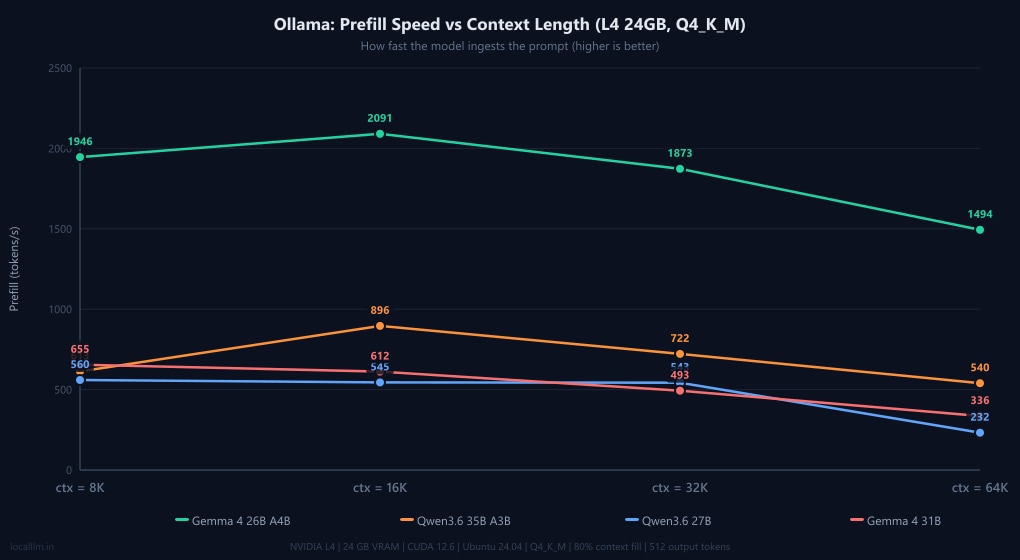
Prefill speeds (prompt ingestion)
llama.cpp — Q4_K_M, Full GPU (-ngl 99 --flash-attn on)
| Model | 8K (t/s) | 16K (t/s) | 32K (t/s) | 64K (t/s) | VRAM @ 64K | Status |
|---|---|---|---|---|---|---|
| Qwen3.6 35B A3B | 65.6 | 63.8 | 59.9 | - | - | ❌ OOM at 64K (add flag below) |
| Gemma 4 26B A4B | 47.0 | 44.5 | 42.6 | 39.3 | 18.7 GB | ✅ Full GPU |
| Qwen3.6 27B | 13.7 | 13.4 | 12.9 | 12.0 | 19.8 GB | ✅ Zero cliff, full GPU |
| Gemma 4 31B | 10.6 | - | - | - | - | ❌ OOM at 16K+ (large KV cache) |
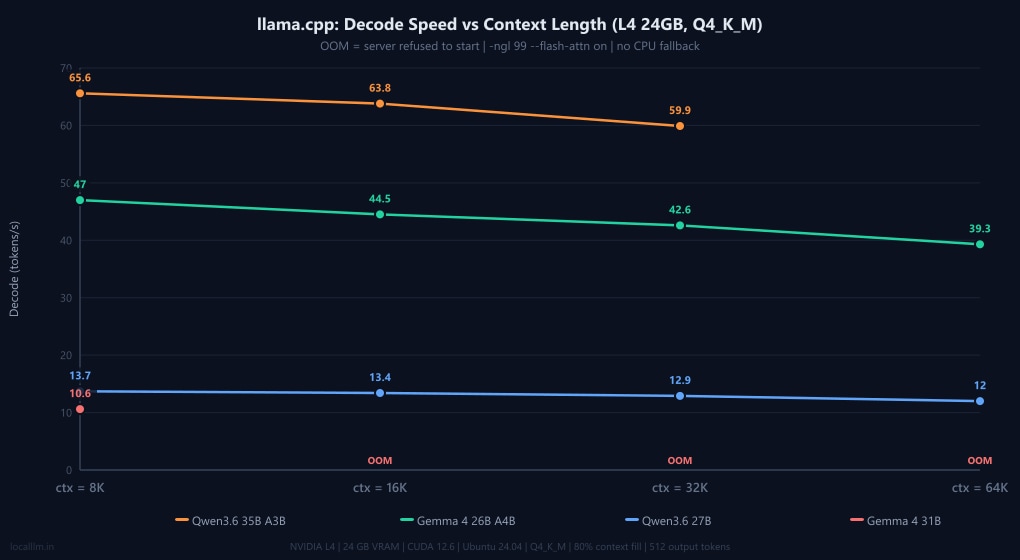
Decode speeds (OOM = server failed to start)
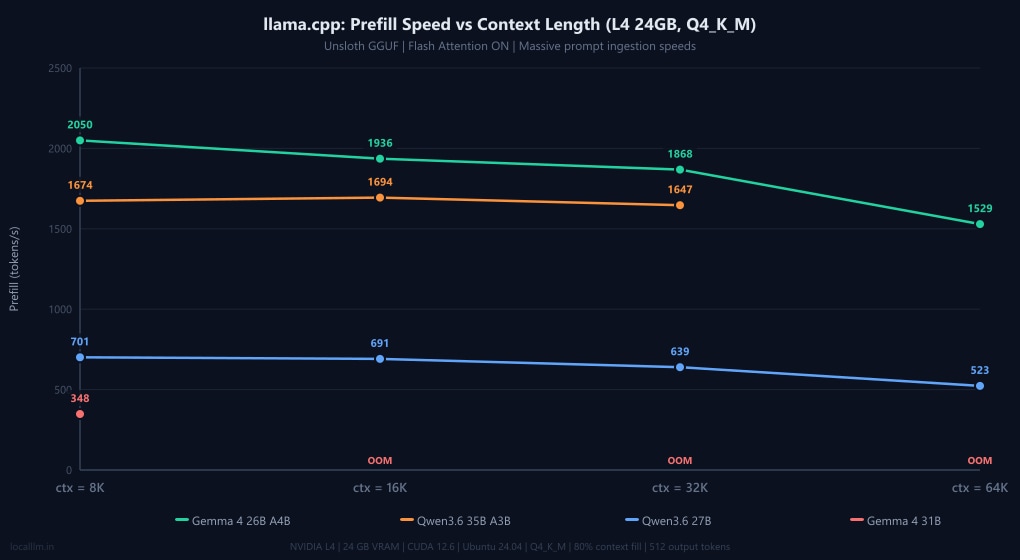
Prefill speeds (Flash Attention ON)
The Prefill Gap: Ingesting the Prompt
Decode speed (how fast the model writes text) is only half the equation. Prefill speed measures how fast the model reads your prompt. If you drop a 32,000-token codebase into your chat window, a prefill speed of 500 t/s means you're waiting 64 seconds just for the model to start thinking. A prefill speed of 2,000 t/s cuts that wait to 16 seconds.
As the charts above show, llama.cpp provides a massive prefill boost to the Qwen3.6 models. While official documentation and our Gemma benchmarks confirm that Ollama automatically enables Flash Attention out-of-the-box for supported architectures (Gemma hits ~2,000 t/s prefill in both engines), Ollama's backend does not appear to fully support Flash Attention for Qwen3.6's newer DeltaNet architecture yet. To confirm whether this bottleneck was simply a configuration oversight, we explicitly forced the OLLAMA_FLASH_ATTENTION=1 environment override and re-ran the benchmarks. The results showed a negligible baseline difference: prefill speeds hovered at 630 t/s at 8K and dropped to 353 t/s at 64K (though this 64K speed represents a ~53% gain over the default 231 t/s, it remains a fraction of full hardware potential). This microscopic variance proves that the issue isn't Ollama failing to toggle a setting; it is an underlying backend limitation. Ollama's current execution pipeline cannot yet map Qwen3.6's hybrid Gated DeltaNet linear attention layers to optimized Flash Attention kernels, forcing a silent fallback to standard, unoptimized attention ingestion. For developers running Qwen's latest architectures who rely on fast prompt processing, switching to llama.cpp remains an absolute necessity.
Optimizations for Higher Context Windows
If your model hits an OOM or you want to push beyond its default context ceiling, these two llama.cpp techniques, which were tested in our benchmarks, are the most effective levers available on 24GB hardware.
MoE Expert Offloading: Unlocking 64K for Qwen3.6 35B A3B
Qwen3.6 35B A3B uses a Mixture-of-Experts architecture where multiple "expert" sub-networks reside in VRAM simultaneously. By offloading a portion of those experts to system RAM with the --n-cpu-moe flag, you free up enough VRAM to allocate the KV cache for 64K context. Our tests found --n-cpu-moe 12 to be the sweet spot: it unlocks full 64K context while keeping decode speed at a practical 22.7 t/s. This is a reasonable trade-off for long-context work. For a detailed breakdown of how VRAM is distributed between model weights, KV cache, and backend overhead across different context lengths, see our llama.cpp VRAM requirements guide.
| Flag | 8K decode | 32K decode | 64K decode | VRAM @ 64K |
|---|---|---|---|---|
| None (baseline) | 65.6 t/s | 59.9 t/s | ❌ OOM | - |
--n-cpu-moe 12 ⭐ | 22.3 t/s | 21.1 t/s | 22.7 t/s | 16.9 GB |
--n-cpu-moe 20 | 20.2 t/s | 14.1 t/s | 11.0 t/s | 13.2 GB |
--n-cpu-moe 24 | 8.1 t/s | 4.2 t/s | 20.3 t/s | 11.4 GB |
The recommended llama.cpp command for Qwen3.6 35B A3B on 24GB VRAM:
llama-server -m Qwen3.6-35B-A3B-UD-Q4_K_M.gguf -ngl 99 --flash-attn on --n-cpu-moe 12Why Qwen3.6 Has a Tiny KV Cache
Both Qwen3.6 27B and 35B A3B share a key architectural advantage: a 3:1 hybrid attention ratio, where 3 out of every 4 layers use Gated DeltaNet (linear attention with no KV cache), and only 1 in 4 uses standard attention with a KV cache. This means only ~16 out of 64 layers carry a KV cache entry. In practice: at 64K context, Qwen3.6 27B's KV cache in llama.cpp is just 4,096 MiB, while Gemma 4 31B's KV cache at a mere 8K context is already 4,240 MiB, which is nearly the same size. This is why Qwen3.6 models handle long contexts so gracefully on constrained VRAM, and why Gemma 4 31B hits OOM in llama.cpp so quickly.
KV Cache Quantization for Qwen3.6 Models
The Qwen3.6 models are highly resilient to KV cache quantization. You can drastically compress their already-small context footprints by passing --cache-type-k q8_0 --cache-type-v q8_0 in llama.cpp. This cuts the context memory to 8-bit with negligible accuracy loss. For even more aggressive VRAM savings, you can push to --cache-type-k q4_0 --cache-type-v q4_0, which halves the cache footprint again at the cost of slightly more quantization noise. Thanks to Qwen3.6's DeltaNet architecture, where only 1 in 4 layers actually carries a KV cache, the quantization error is distributed over a tiny fraction of the network, making both q8 and q4 viable options where other models would show clear quality degradation.
Practical Nuances & Troubleshooting
Before you lock in your setup, keep these two crucial nuances in mind:
- Multimodal Memory Overhead: The Qwen3.6 and Gemma 4 models feature vision capabilities. Ollama loads the vision projector by default, consuming precious VRAM even if you only send text. In our llama.cpp tests, we ran the standard text-only GGUFs (excluding the separate
mmprojfile). If you are strictly doing agentic coding or text generation, stick to llama.cpp (or use same gguf with ollama) to reclaim VRAM for a larger context window. - Manual CPU Offloading: Notice how Ollama survived Gemma 4 31B at 64K while llama.cpp threw an OOM error? That's because we used
-ngl 99in llama.cpp to force 100% GPU execution. If you encounter OOMs in llama.cpp, you can manually replicate Ollama's survival mechanism by lowering the number of offloaded layers (e.g.,-ngl 30). The model will spill over to your system RAM. Performance will tank, but it will run. For a full breakdown of how Ollama handles GPU offloading and what to expect at different VRAM capacities, see our Ollama VRAM requirements guide.
Agentic Coding Capabilities: The Flappy Bird Challenge
Benchmarks often fail to capture "vibe coding" - the ability of a model to iteratively build a complex creative project without much technical oversight. To assess this, we historically conducted a rigorous Agentic Coding Challenge using the Cline extension within Cursor IDE.
In our previous tests, 24GB VRAM models struggled massively here. Generating a fully playable, aesthetically pleasing game used to be a hurdle, with models often hallucinating SVG data, failing game loop logic, or just drawing solid green rectangles.
Not anymore.
The latest generation of models has turned what used to be a grueling test of agentic capability into a victory lap. All four models tested produced polished, playable games. However, peering under the hood at their architectural choices, state management, and Python implementations reveals stark differences in how these models "think" as software engineers.
Test Methodology
- Environment: Models ran via Ollama connected to Cline in Cursor IDE.
- Context Settings: Context window set to 48k tokens.
- Workflow: Plan Mode → Approved → Act Mode.
The Prompt: "Create a flappy birds clone with high quality graphics. Use HTML, CSS, and JavaScript for the frontend UI, and a very basic Python backend using only the standard library. No frameworks such as Flask, Django, FastAPI, or similar. Python is already installed. No db no dependencies. Work in the same dir. Dont make any additional directories."
(Note: I have embedded short video clips of each model's generated game below so you can see the fluid animations and particle effects in action!)
The Verdict: A Generational Leap and a Clear Winner
While all models produced playable games, Qwen3.6 27B (Dense) is the definitive clear winner.
It didn't just write a script; it engineered a resilient full-stack application. It built a proper REST API in Python with CORS handling, implemented a JSON-based database for top-10 high scores, and crucially, wrote frontend fetch logic that included a .catch() block to gracefully fall back to local storage if the backend failed. This level of defensive programming in a zero-shot prompt is exceptional for an open source large language model.
Here is the technical breakdown of how each model approached the task:
1. The Winner: Qwen3.6 27B (Dense)
- Execution: Flawless zero-shot execution. Used 33.3k tokens.
- Backend: Implemented a full socketserver handling GET, POST, and OPTIONS (CORS). It reads/writes to a
scores.jsonfile, automatically sorting and truncating to a Top 10 list. Allows port re-binding (allow_reuse_address = True). - Frontend: Implemented a robust state machine (menu, playing, gameover). The graphics engine uses procedural stacking (drawing overlapping arc paths) to create fluffy clouds, striped grass patterns, and dynamic medals based on score thresholds. It also features a physics-based particle system with life decay and gravity vectors. However, bird controls felt a bit stiff, and it lacked input debouncing on the Game Over screen, meaning lingering spacebar taps would instantly and accidentally restart the game before you could check your score.
2. The Visual Powerhouse (with a flaw): Qwen3.6 35B (MoE)
- Execution: Excellent zero-shot graphics, but failed on async state management. Used 34.0k tokens (compressed to 27.5k after debugging).
- The Bug: It introduced a race condition. Because it used a
setTimeoutto delay the Game Over UI, mashing the spacebar started a new game in the background while the previous game's UI finally popped up. (Note: It successfully fixed this bug autonomously when prompted once, addingisTransitioningboolean locks). - Frontend: The most mathematically impressive rendering. It used sine waves (
Math.sin()) to generate animated, multi-layered parallax mountains and dynamic grass blades. Particles had varying shapes (circles vs. procedural stars). It utilized advanced CSS animations (keyframe bouncing, glassmorphism) for the UI. - Backend: Compliant and literal. It strictly followed the "no db" constraint by building a clean, lightweight static HTTP server to host the game files. It appropriately offloaded high-score persistence to the browser's localStorage rather than overengineering the Python script.
3. The Most Efficient: Gemma 4 31B (Dense)
- Execution: Flawless zero-shot. Incredibly efficient context usage (only 26.0k tokens).
- Backend: Built a true API handling POST/GET requests, reading and writing raw text to a
highscore.txtfile. - Frontend: Procedural JavaScript (no classes). While looking at the code reveals a notable anti-pattern (wrapping
requestAnimationFrame(draw)inside asetTimeoutblock), the actual gameplay was excellent. Bird control was noticeably smoother and more fluid than the Qwen models, and it properly handled the Game Over state, safely ignoring lingering spacebar taps so you didn't accidentally restart the game.
4. The Clumsiest Architect: Gemma 4 26B (MoE)
- Execution: Achieved zero-shot completion but struggled heavily with the agentic harness (multiple failed tool calls and invalid API formatting). Used 33.0k tokens.
- The Bug: It had a state logic error where the score continued to increase endlessly if you remained on the Game Over screen. (Note: It successfully fixed this when prompted once).
- Frontend: Ironically, despite agentic clumsiness, it wrote the cleanest, most modern ES6 Object-Oriented code (proper
class Bird,class Pipe,class Cloud). Like its larger sibling, the bird controls were very fluid and it correctly prevented accidental restarts on the Game Over screen. - Backend: Strictly compliant. It adhered perfectly to the "no db" instruction by writing a focused static file server. It notably included a custom request handler to safely inject CORS headers (
Access-Control-Allow-Origin), smartly leaving score state management entirely to the frontend via localStorage.
Detailed Technical Comparison Matrix
| Feature | 🏆 Qwen3.6 27B (Dense) | Qwen3.6 35B (MoE) | Gemma 4 31B (Dense) | Gemma 4 26B (MoE) |
|---|---|---|---|---|
| Agentic Friction | Zero. Flawless tool usage. | Low. Required 1 prompt to fix a state bug. | Zero. Flawless tool usage. | High. Multiple failed tool calls, and required 1 prompt to fix a scoring bug. |
| Backend Implementation | Excellent. REST API, full CORS, JSON read/write, sorts Top 10. | Basic. Static file server only. No data persistence. | Good. Custom GET/POST handlers reading to .txt. | Basic. Static file server only. No data persistence. |
| Frontend Architecture | Excellent. State machine, defensive API calls with localStorage fallback. | Good. Impressive UI, but introduced async race conditions. | Fair. Functional approach, but used a double-throttling setTimeout anti-pattern. | Excellent. Very clean ES6 OOP structure (class Bird, etc.). |
| Gameplay & Controls | Stiff controls. Accidental instant restarts on Game Over. | Stiff controls. Race conditions caused background restarts. | Very smooth controls. Safe Game Over state handling. | Very smooth controls. Safe Game Over state handling. |
| Rendering / Graphics | High. Custom particle physics engine, CSS gradients, dynamic medals. | Highest. Sine-wave parallax mountains, star-shaped particles, CSS glassmorphism. | Medium. Multi-part gradients, simple arc-based clouds. | Medium. Quality radial gradients, canvas rotation math based on velocity. |
| Context Used | 33.3k / 48k | 34.0k (compressed to 27.5k) | 26.0k / 48k (Most efficient) | 33.0k / 48k |
Takeaway: Time for a Harder Benchmark
If there is one thing this deep-dive proves, it’s that the "Flappy Bird" prompt is officially retired for this tier of models. The fact that a local model running on a consumer GPU can autonomously architect a Python REST API, write fallback-ready frontend fetch logic, and implement a custom particle physics engine in HTML5 Canvas on the first try is staggering.
Moving forward, we will have to demand significantly more from these models to find their breaking points. Future benchmarks will need to incorporate multi-file architectures, complex third-party API integrations, or 3D rendering to truly separate the good from the great.
Model Recommendations by Use Case
Best Overall & Agentic Coding: Qwen3.6 27B (Reasoning)
When to choose: Daily driving, agentic coding workflows, complex multi-step reasoning, document analysis.
Key strengths:
- Highest Intelligence Index in the 24GB tier: 45.8
- Best TAU2 score (94.2%), demonstrating strong agentic task completion
- Winner of the Flappy Bird coding challenge: flawless zero-shot, full REST API with CORS and JSON persistence
- Excellent long-context performance in llama.cpp (full GPU to 64K, only 4,096 MiB KV cache)
- Ollama command:
ollama run qwen3.6:27b
Best for Coding & Scientific Reasoning: Gemma 4 31B (Reasoning)
When to choose: Complex code generation, scientific problem-solving, instruction-heavy workflows.
Key strengths:
- Highest Coding Index: 38.7
- Highest GPQA Diamond (85.7%) and SciCode (43.4%) among tested models
- Highest IFBench (75.6%), meaning it excels at following detailed, nuanced instructions
- Flawless zero-shot agentic execution at 26k tokens, making it the most efficient of all four
- Ollama command:
ollama run gemma4:31b
Best for Speed & Long-Context (with tuning): Qwen3.6 35B A3B (Reasoning)
When to choose: Agentic pipelines where throughput matters, long-context work with the right flags.
Key strengths:
- Fastest decode speed of all four: 65.6 t/s at 8K context in llama.cpp
- MoE architecture (3B active params) keeps VRAM lean and speed high
- With
--n-cpu-moe 12, unlocks 64K context at 22.7 t/s on 24GB VRAM - Best prefill speed in llama.cpp at short contexts (~1,694 t/s at 16K)
- Ollama command:
ollama run qwen3.6:35b-a3b
Best for Long-Context Stability Out-of-the-Box: Gemma 4 26B A4B
When to choose: Summarizing long documents, large codebase analysis, users who want "it just works" reliability without llama.cpp flags.
Key strengths:
- Only model to sustain full GPU execution from 8K to 64K in both Ollama and llama.cpp
- Loses less than 15% decode speed across the entire 8K–64K sweep
- Cleanest ES6 OOP code in the agentic challenge (despite some agentic friction)
- Smoothest gameplay controls of all four models in the coding challenge
- Ollama command:
ollama run gemma4:26b
Optimization Strategies for 24GB VRAM
Quantization Selection
Use Q4_K_M quantization for optimal balance between quality and VRAM usage. This reduces model size by ~75% with minimal quality loss, allowing 30B-32B models to fit comfortably in 24GB VRAM.
Beginner tip: Popular platforms like Ollama and LM Studio provide Q4 quantized models by default through their official libraries, so you can simply download and run without worrying about quantization settings. To learn more about how quantization works and other quantization formats, check out our complete guide to LLM quantization.
Context Window Management
Start with 8K-32K context windows and scale based on actual needs. Monitor VRAM usage and generation speed as you increase context length.
Need to adjust context settings? Check our guides on increasing context window in Ollama and increasing context window in LM Studio.
Reasoning vs Speed Trade-offs
Reasoning variants provide 40-80% better performance on complex tasks but may generate slower. Use reasoning variants as your default and switch to non-reasoning only for simple, speed-critical tasks. Note that most reasoning models allow you to toggle reasoning on/off per request, giving you flexibility without needing to switch models entirely.
Recommended GPUs for 24GB VRAM Models
To run the 30B-32B class models effectively, you need a GPU with 24GB of VRAM. Here are the best options currently available, ranging from consumer flagships to professional workstation cards.
| GPU Model | Type | VRAM | Best For |
|---|---|---|---|
| NVIDIA RTX 3090 / 3090 Ti | Consumer (Used) | 24GB GDDR6X | Best Value: Excellent performance per dollar on the used market. |
| NVIDIA RTX 4090 | Consumer (High-End) | 24GB GDDR6X | Best Performance: Fastest inference speeds for consumer hardware. |
| NVIDIA RTX 5090 | Consumer (Flagship) | 32GB GDDR7 | Future Proof: Massive 32GB buffer allows running larger quants or higher context. |
| NVIDIA A10G | Data Center | 24GB GDDR6 | Cloud Inference: Budget-friendly data center option for smaller models. |
| NVIDIA L4 | Data Center | 24GB GDDR6 | Cloud Inference: Efficient, stable card for server deployment with 24GB capacity. |
| NVIDIA RTX 6000 Ada | Workstation | 48GB GDDR6 | Pro Workflows: Double the VRAM for running 70B models or massive batches. |
| Mac Studio (M4 Max) | Apple Silicon | 36GB-128GB Unified | Mac Alternative: Configurable unified memory, slower inference than NVIDIA but good for development. |
| Mac Studio (M3 Ultra) | Apple Silicon | 64GB-192GB Unified | Mac Alternative: Massive memory capacity for very large models, up to 192GB available. |
Conclusion
With 24GB of VRAM, you're no longer just running chatbots. You're running capable reasoning engines completely offline that can architect software, analyze documents, and outperform many cloud APIs, all on your own hardware. Our three-method evaluation paints a clear and nuanced picture: benchmarks tell you the ceiling, hardware tests reveal the floor, and the agentic challenge exposes what happens when models are left to think for themselves.
Qwen3.6 27B (Reasoning) is the undisputed daily driver. It leads on intelligence, wins the coding challenge, and handles 64K context gracefully in llama.cpp. Gemma 4 31B (Reasoning) is the specialist's choice for pure code generation and scientific reasoning. It is also the most context-efficient model we tested. Qwen3.6 35B A3B is the speed demon: nothing touches 65.6 t/s on 24GB, and with a single flag it becomes a capable long-context workhorse too. And if you want a model that "just works" at any context length without tuning, Gemma 4 26B A4B is the quiet reliability champion.
The 24GB VRAM tier has matured to the point where the Flappy Bird prompt is now officially retired as a differentiator. Every model passed it. The next frontier is multi-file architectures, real API integrations, and 3D rendering. The bar keeps rising, and these models keep clearing it.
References
- Artificial Analysis - Benchmark scores for GPQA, SciCode, IFBench, TAU2, TerminalBench Hard, and Artificial Intelligence/Coding Indexes. Available at: https://artificialanalysis.ai/
Frequently Asked Questions
What is the best local LLM for 24GB VRAM in 2026?
Our testing across benchmarks, hardware, and agentic tasks reveals four strong options. Qwen3.6 27B (Reasoning) is the best overall: it has the highest Intelligence Index (45.8), won the agentic coding challenge with flawless zero-shot execution, and handles 64K context gracefully in llama.cpp. For pure coding and scientific tasks, Gemma 4 31B (Reasoning) leads with a 38.7 Coding Index and the highest GPQA (85.7%). If raw speed is your priority, Qwen3.6 35B A3B reaches 65.6 t/s decode in llama.cpp. And for plug-and-play long-context reliability, Gemma 4 26B A4B is rock-solid from 8K to 64K in both Ollama and llama.cpp.
How do 24GB VRAM models compare to 16GB VRAM models?
The jump from 16GB to 24GB VRAM is significant. At 16GB you're mostly limited to 13B-14B models at Q4, which are capable chat assistants but struggle with complex multi-step agentic workflows. At 24GB you can comfortably run 27B-35B class models like Qwen3.6 27B and Gemma 4 31B, which scored 45.8 and 39.2 on the Intelligence Index respectively. These are genuinely production-capable models that can architect full-stack applications, handle 32K-64K context, and pass difficult scientific reasoning benchmarks.
Should I choose reasoning or non-reasoning variants?
Reasoning variants significantly outperform non-reasoning versions on complex tasks. In our benchmark data, Gemma 4 31B (Reasoning) scores a 39.2 Intelligence Index versus 32.3 for the non-reasoning variant on the exact same architecture, resulting in a nearly 7-point boost. Use reasoning variants for coding, multi-step problem solving, document analysis, and agentic tasks. Both Qwen3.6 and Gemma 4 allow toggling reasoning on or off per request, so you can use a single model for both fast simple queries and deep reasoning without switching.
What are the best models for coding with 24GB VRAM?
Gemma 4 31B (Reasoning) leads on benchmark coding metrics with a 38.7 Coding Index, 43.4% on SciCode, and the highest IFBench (75.6%) for instruction-following, which is critical for agentic tasks. In our practical Flappy Bird coding challenge, Qwen3.6 27B (Reasoning) was the outright winner: it executed flawlessly on the first try, built a proper REST API with CORS and JSON persistence, and implemented defensive frontend code with a localStorage fallback. For raw coding throughput in agentic pipelines, Qwen3.6 35B A3B's 65.6 t/s decode speed is unmatched.
How do I fix out-of-memory (OOM) errors with local LLMs on 24GB VRAM?
There are two main approaches. In llama.cpp, you can lower GPU layer offloading with the -ngl flag (e.g., -ngl 30 instead of -ngl 99) to spill some layers to system RAM. Performance will drop, but the model will run. For Qwen3.6 35B A3B specifically, using --n-cpu-moe 12 offloads MoE experts to RAM and unlocks full 64K context while keeping decode at a practical 22.7 t/s. You can also compress the KV cache with --cache-type-k q8_0 --cache-type-v q8_0 (or q4_0 for more aggressive savings). Qwen3.6 models are particularly resilient to this due to their DeltaNet hybrid attention architecture.
How do I optimize 24GB VRAM for maximum performance?
Key optimization strategies: (1) Use Q4_K_M quantization, as it reduces model size by ~75% with minimal quality loss and is the format all our benchmarks used. (2) Use llama.cpp with --flash-attn on for significantly faster prefill speeds, especially for Qwen3.6 models where it can reach ~1,700-2,000 t/s. (3) For Ollama users, note that it automatically handles layer offloading to keep models running past VRAM limits, but this comes at a speed cost. (4) If using Qwen3.6 for multimodal tasks, be aware that Ollama loads the vision projector by default. Use the text-only GGUF in llama.cpp to reclaim VRAM for larger context windows.