llama.cpp VRAM Requirements: Complete 2026 Guide to GPU Memory for Local LLMs
You've downloaded llama.cpp and downloaded your GGUF files. You're ready to run powerful AI models locally on your hardware. But then reality hits: your GPU runs out of memory, or the model refuses to load your requested context window. The culprit? Video RAM.
Video RAM isn't just another specification; it is the absolute hard limit that defines which AI models you can run completely on your local GPU. In llama.cpp, if you exceed your VRAM, you have to offload layers to your system CPU and RAM, which severely cripples inference speeds.
This guide eliminates the guesswork. We've benchmarked popular local models directly under llama.cpp, measuring exact VRAM consumption with expansive 32K and 64K token context windows. You'll understand the underlying VRAM math to make informed decisions about exactly which models fit onto your graphics card.
TL;DR: How Much VRAM Do You Need for llama.cpp?
If you are running models at Q4_K_M quantization with a respectable 32K context window:
- 8GB VRAM (e.g., RTX 4060): Can comfortably run ~9B parameter models (Requires ~6.8 GB VRAM).
- 12GB VRAM (e.g., RTX 4070): Excellent for ~14B parameter models with plenty of room for large contexts.
- 16GB VRAM (e.g., RTX 4080): Perfect for pushing heavy contexts or running ~20B parameter models.
- 20GB VRAM (e.g., RX 7900 XT): Easily handles ~27B parameter models (Requires ~18-19.5 GB VRAM).
- 24GB VRAM (e.g., RTX 3090 / 4090): The sweet spot for flagship consumer hardware, capable of running ~35B parameter models (Requires ~21.7 GB VRAM).
- 32GB VRAM (e.g., RTX 5090): The bleeding-edge threshold. Easily runs 35B models at extreme large contexts (>250K) or accommodates dense ~70B parameter models at massive quantizations.
- Multi-GPU / 48GB+: Required for comfortable use of dense 70B+ or 100B+ models with heavy context.
(Note: Context size drastically changes VRAM needs. Expanding context can easily add 1-2 GB to your VRAM requirements).
Understanding llama.cpp's VRAM Architecture
llama.cpp dynamically manages VRAM allocation through its backend processing. When you load a model, three primary factors determine your total VRAM consumption:
Base Overhead (Baseline):
Before a single weight is loaded, the backend (such as CUDA) requires memory for its compute context and the driver infrastructure. In our testing on high-end hardware, this baseline overhead is reliably around 0.75 GB.
Model Weights:
This is the VRAM cost of the core parameters. Quantization heavily impacts this. By utilizing the recommended Q4_K_M quantization, you slash the required VRAM by over half compared to FP16, hitting the optimal sweet spot between memory storage and intelligence degradation.
KV Cache:
The Key-Value (KV) cache acts as your model's short-term memory. We test explicitly at a massive 32,768 (32K) context window, mimicking complex workflows like code synthesis or extensive document ingestion, significantly bumping up the required VRAM bounds compared to small default chat windows.
llama.cpp VRAM Requirements: Comprehensive Measurements
We rigorously benchmarked multiple advanced models at Q4_K_M quantization configured for aggressive 32K and 64K context windows under llama.cpp using a full-layer GPU offload strategy.
Quick Reference: 32K Context VRAM Requirements
| Model | Parameters | File Size | Weights VRAM | KV Cache (32K) | Total Running VRAM |
|---|---|---|---|---|---|
| Qwen3.5-9B Q4_K_M | ~9B | 5.29 GB | 5.80 GB | 0.98 GB | 6.78 GB |
| Qwen3.5-27B Q4_K_M | ~27B | 15.59 GB | 16.10 GB | 1.96 GB | 18.06 GB |
| GLM-4.7-Flash Q4_K_M | ~27B | 17.05 GB | 17.72 GB | 1.63 GB | 19.35 GB |
| Qwen3.5-35B-A3B Q4_K_M | ~35B | 20.50 GB | 21.06 GB | 0.61 GB | 21.67 GB |
Quick Reference: 64K Context VRAM Requirements
What happens if you push the context even further? Bumping from 32K to 64K essentially acts as a VRAM multiplier for your KV cache overhead, which can single-handedly force you into a smaller model or force multi-GPU scaling.
| Model | Parameters | File Size | Weights VRAM | KV Cache (64K) | Total Running VRAM |
|---|---|---|---|---|---|
| Qwen3.5-9B Q4_K_M | ~9B | 5.29 GB | 5.80 GB | 1.97 GB | 7.77 GB |
| Qwen3.5-27B Q4_K_M | ~27B | 15.59 GB | 16.10 GB | 3.96 GB | 20.06 GB |
| GLM-4.7-Flash Q4_K_M | ~27B | 17.05 GB | 17.72 GB | 3.28 GB | 21.00 GB |
| Qwen3.5-35B-A3B Q4_K_M | ~35B | 20.50 GB | 21.06 GB | 1.24 GB | 22.29 GB |
(All models tested at Q4_K_M quantization. Total VRAM running cost includes an additional ~0.75 GB backend baseline overhead).
Here is exactly how the VRAM breaks down line-by-line:
1. Mid-Tier Constraints (9B Scale)
Models hovering around the 7B to 9B range are the community favorites. They balance deep reasoning capabilities while remaining accessible.
Model Tested: Qwen3.5-9B (Q4_K_M)
- File Size: 5.29 GB
- Backend Baseline: 0.75 GB
- Weights Only: 5.80 GB
- KV Cache (32K Context): 0.98 GB (Total: 6.78 GB)
- KV Cache (64K Context): 1.97 GB (Total: 7.77 GB)
Hardware Fit: With a 32K context, this perfectly accommodates traditional 8GB VRAM consumer cards like the RTX 4060 or past-gen RTX 3060ti. However, attempting to stretch to 64K pushes the required VRAM to 7.77GB, which is critically close to the absolute 8GB limit and will likely crash if you are running display output on the same GPU.
2. High-End Scaling (27B Scale)
If your hardware is a little beefier, running models near the 27B parameter threshold unlocks significantly richer inference, coding, and logical capacity.
Model Tested: Qwen3.5-27B (Q4_K_M)
- File Size: 15.59 GB
- Backend Baseline: 0.75 GB
- Weights Only: 16.10 GB
- KV Cache (32K Context): 1.96 GB (Total: 18.06 GB)
- KV Cache (64K Context): 3.96 GB (Total: 20.06 GB)
Model Tested: GLM-4.7-Flash (Q4_K_M)
- File Size: 17.05 GB
- Backend Baseline: 0.75 GB
- Weights Only: 17.72 GB
- KV Cache (32K Context): 1.63 GB (Total: 19.35 GB)
- KV Cache (64K Context): 3.28 GB (Total: 21.00 GB)
Hardware Fit: A single 24GB GPU (like an RTX 3090 or RTX 4090) will smoothly run these models completely in VRAM even at a massive 64K context with zero latency bottlenecks. 20GB cards (like the RX 7900 XT) can comfortably handle them at 32K context, but expanding to 64K context puts them right at the precipice of overflowing.
3. Maximum Consumer Capacity (35B Scale)
Pushing the limits of a traditional single 24GB consumer GPU.
Model Tested: Qwen3.5-35B-A3B (Q4_K_M)
- File Size: 20.50 GB
- Backend Baseline: 0.75 GB
- Weights Only: 21.06 GB
- KV Cache (32K Context): 0.61 GB (Total: 21.67 GB) (Advanced routing drastically reduces KV footprint relative to parameter size)
- KV Cache (64K Context): 1.24 GB (Total: 22.29 GB)
Hardware Fit: Operating dangerously close to the 24GB ceiling. This setup sits perfectly inside a multi-GPU array or cleanly on a headless 24GB GPU setup. Note that running your computer's display concurrently may occupy enough VRAM to push a 64K context slightly over the 24GB limit, bringing your system to a halt or forcing partial CPU offloading.
MoE Throughput Advantage: While Qwen3.5-35B-A3B occupies significantly more VRAM than Qwen3.5-9B (approx. 21.1 GB vs approx. 5.8 GB for weights), it actually delivers higher throughput (tokens/second) and better time-to-first-token (TTFT) on the same GPU. Being a Mixture-of-Experts model, only a small fraction of its parameters (approx. 3B active per token) participate in each forward pass. So despite the larger VRAM footprint for loading all experts, the per-token compute cost remains low. If you have a 24GB GPU, the 35B-A3B is not just a capability upgrade over the 9B, it is also a speed upgrade.
Charting Total VRAM Capacity Needs

The data clearly underlines that your chosen Context Window is not free.
For a 27B model, a 64K context adds almost a flat 4 GB (3.96 GB specifically for Qwen3.5-27B) of pure VRAM on top of what's required for the weights and base initialization! This directly combats the notion that model file sizes alone dictate if an AI will run on your hardware. For example, Qwen3.5-27B sits as a 15.6 GB .gguf file, but forcefully asks for over 20 GB of real-world VRAM runtime execution space at 64K context lengths.
Deep Dive: Pushing Limits on the RTX 5090 (32GB VRAM)
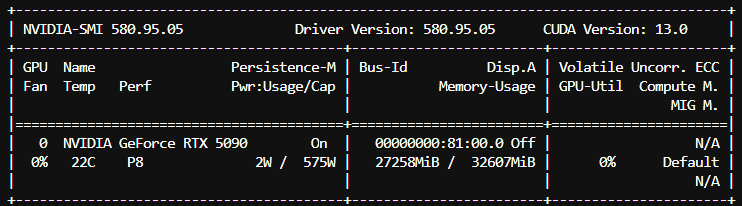
With the release of the RTX 5090 and its massive 32 GB of VRAM, the hardware boundaries have shifted. This extra VRAM capacity opens the door to incredibly long context windows for heavy models. We ran an extreme 262k context test with the Qwen3.5-35B-A3B (Q4_K_M) model to see how the local hardware scales when pushed to its absolute limits.
(Note: This extreme context test was executed natively in llama.cpp using the following exact flags: -m <MODEL_PATH> -ngl 99 --flash-attn on -c 262000)
Here is the direct comparison between a standard 32k context and a massive 262k context limit handled natively on an RTX 5090:
| Metric | 32k Context | 262k Context | Difference / Delta |
|---|---|---|---|
| TTFT (Time to First Token) | 29.0 ms | 42.3 ms | +13.3 ms |
| TPOT (Time per Output Token) | 4.9 ms/token | 4.9 ms/token | 0.0 ms |
| Prefill Speed | 792.9 tokens/sec | 543.3 tokens/sec | -249.6 tokens/sec |
| Decode Speed | 204.7 tokens/sec | 203.1 tokens/sec | -1.6 tokens/sec |
| VRAM Usage | 22,450 MiB (~22.4 GB) | 27,258 MiB (~27.3 GB) | +4,808 MiB |
| Total Wall Time | 9.93 s | 9.96 s | +0.03 s |
| Prompt / Gen Tokens | 23 / 2000 | 23 / 2000 | - |
(Note: We recommend ensuring you have at least 32GB of VRAM available before attempting 262k context benchmarks on a 35B model, as it natively operates at ~27.3 GB).
262K Context Benchmark Data

Key Takeaways from the 262K Test:
- The KV Cache Scales Efficiently: Because Qwen3.5-35B-A3B acts as an optimized MoE model utilizing Grouped Query Attention (GQA), filling the incredible 262,144 token context only increases VRAM by roughly ~4.8 GB compared to the baseline 32K context. This allows it to comfortably fit on a 32GB RTX 5090 without spilling over to system RAM.
- Minimal Degradation in Generation Speed: The Decode Speed and TPOT remain virtually identical. The RTX 5090 still churns out over 200 tokens per second! Pushing the context window strictly to hardware bounds has negligible effects on the output streaming speed.
- Prefill Execution is Where it Costs: The primary performance shift occurs during the prefill stage (where the model digests the massive prompt initially), dropping from ~793 tokens/sec down to ~543 tokens/sec. This leads to the marginal bump in the Time to First Token (TTFT).
Benchmarking Multi-User Concurrency (24GB GPU Tier)
If you plan to expose your local llama.cpp server to multiple users or use it as an API backend for several concurrent agentic applications, understanding your VRAM limitations under concurrency is crucial.
Using the llama-server binary with the --parallel N flag (or -np N), we simulate what happens to your VRAM and Tokens Per Second (TPS) when a 24GB GPU is hit by multiple simultaneous requests.
Model Tested: Qwen3.5-35B-A3B (Q4_K_M)
Hardware Setup: 24GB High-End GPU Tier
Concurrency Constraint: 4 Simultaneous Users (at 8K Context individually)
- Backend + Weights VRAM: ~21.25 GB
- Multi-User KV Cache (4 Users x 8K Context): 0.80 GB (Total: ~22.05 GB)
- Average Time to First Token (TTFT): 6.2s
- Average Decode Speed (Per User): ~18.1 tokens/sec
- Total Combined System Output: ~30.3 tokens/sec
Key Takeaways for Concurrency:
- Separated KV Cache Buckets: Every concurrent user forces
llama.cppto carve out an independent KV cache memory slot in VRAM. Amazingly, because of the hyper-efficient Grouped Query Attention (GQA) combined with MoE sparse activation, the 35B model requires only ~200MB of KV cache per concurrent user slot at 8K context. - Stable Throughput Delivery: Even when hammered by 4 aggressive simultaneous inference requests, a 24GB GPU comfortably stays below the crash threshold (hitting roughly ~22.05 GB VRAM) while stably delivering an average of ~18 tokens per second to each user simultaneously. As long as the sum of all concurrent users' context memory fits comfortably in your remaining VRAM limits,
llama.cppacts as a remarkably robust multi-user scaling backend.
Advanced VRAM Optimization Tricks for Long Contexts
If you find yourself running uncomfortably close to your GPU's physical memory limits when pushing massive context windows, llama.cpp boasts a fantastic advanced feature that can squeeze even more efficiency out of your hardware.
KV Cache Quantization
By default, the KV cache uses standard FP16 (16-bit precision), meaning your context window footprint grows substantially with length. However, you can explicitly instruct llama.cpp to quantize the KV cache down to 8-bit (Q8_0) or even 4-bit (Q4_0) precision by simply passing the --cache-type-k and --cache-type-v flags (for instance, --cache-type-k q8_0 --cache-type-v q8_0).
Quantizing the KV cache to 8-bit essentially cuts the context VRAM penalty completely in half, with a slight degradation to the model's output quality. However, some newer generation models, especially the Qwen 3.5 series, handle KV cache quantization exceptionally well with minimal impact on reasoning.
Conclusion
VRAM is a hard boundary with llama.cpp. Squeezing into VRAM ensures absolute zero data transfer latency from disk/RAM bridges, offering real-time token delivery limits.
If buying new hardware or orchestrating cloud GPU instances, check out our complete guide to the best GPUs for local LLMs:
- 8GB VRAM covers local essentials (<10B configurations with up to 32K context).
- 16GB-20GB VRAM smoothly accommodates heavier ~14-25B configurations.
- 24GB VRAM safely plays host to the absolute ceiling limits of the single-GPU compute world (such as high-parameter ~35B variants).
- 32GB VRAM (e.g., RTX 5090) pushes the horizon to massive MoE setups and extreme 250K+ context lengths for deep agentic reasoning tasks.
By combining efficient GGUF quantization (Q4_K_M) with mindful context management, navigating the local LLM paradigm becomes a much more precise science.
Frequently Asked Questions
How does context length impact VRAM in llama.cpp?
In local llms, VRAM usage is the sum of model weights plus the key-value (KV) cache. The KV cache grows linearly with context length, but architecture deeply matters. The Qwen 3.5 series utilizes Grouped Query Attention (GQA) to drastically minimize its footprint. For ~9B and 27B models, expanding context from 8K to 32K requires roughly 1 to 2 GB of VRAM for the KV cache, and jumping to a massive 64K context requires 2 to 4 GB. Advanced MoE architectures like Qwen3.5-35B-A3B are even more hyper-optimized, barely requesting 1.2 GB of KV cache for an entire 64K context window.
Can I run a 35B model on a single 24GB GPU using llama.cpp?
Yes, you can run a 35B parameter model on a single 24GB GPU with llama.cpp by utilizing quantization. For example, Qwen3.5-35B at Q4_K_M quantization requires about 21.6 GB of VRAM, including a 32K context window and the backend baseline overhead, allowing it to easily fit on an RTX 3090 or RTX 4090.
What is the best quantization level for llama.cpp?
Q4_K_M is the recommended quantization for most users. It offers the best balance of quality and VRAM efficiency by compressing model weights to 4-bit precision, reducing VRAM requirements by approximately 75% compared to full FP16 precision, with minimal output degradation.